

How to Prevent Browser Fingerprinting and Protect Your Online Privacy
Learn what browser fingerprinting is, why websites use it to track users, and how to reduce your fingerprint with anti-detect browsers, privacy tools, and safer browsing habits.

Online privacy and anonymity have become a rising concern in recent years, as the vast majority of our population became avid users of the internet for both leisure and work. Due to its widespread nature, the internet became a honeypot for exploitative actors – the government, large enterprises, malicious hackers, data brokers, scammers are trying their best to track users and gain as much of your personal information as possible.
This is why circumvention tools are all the rage nowadays – netizens aren’t just practicing online hygiene, more so they are fed up by predatory technology and constant surveillance. However, utilizing a VPN service or proxies doesn’t cut it anymore, as the trackers evolve past their capabilities. In this article we’ll talk about browser fingerprinting and how to avoid it.
Browser Fingerprinting Protection
First of all, you need to know what you’re dealing with. To run a test of what your browser reveals about you, go to Iphey.com and wait for the results. Iphey is an audit tool that runs an extensive browser fingerprint check and shows you which details any regular website extracts from your browser. For a quick demo, let’s use my own computer. Here’s an example of what you might see:
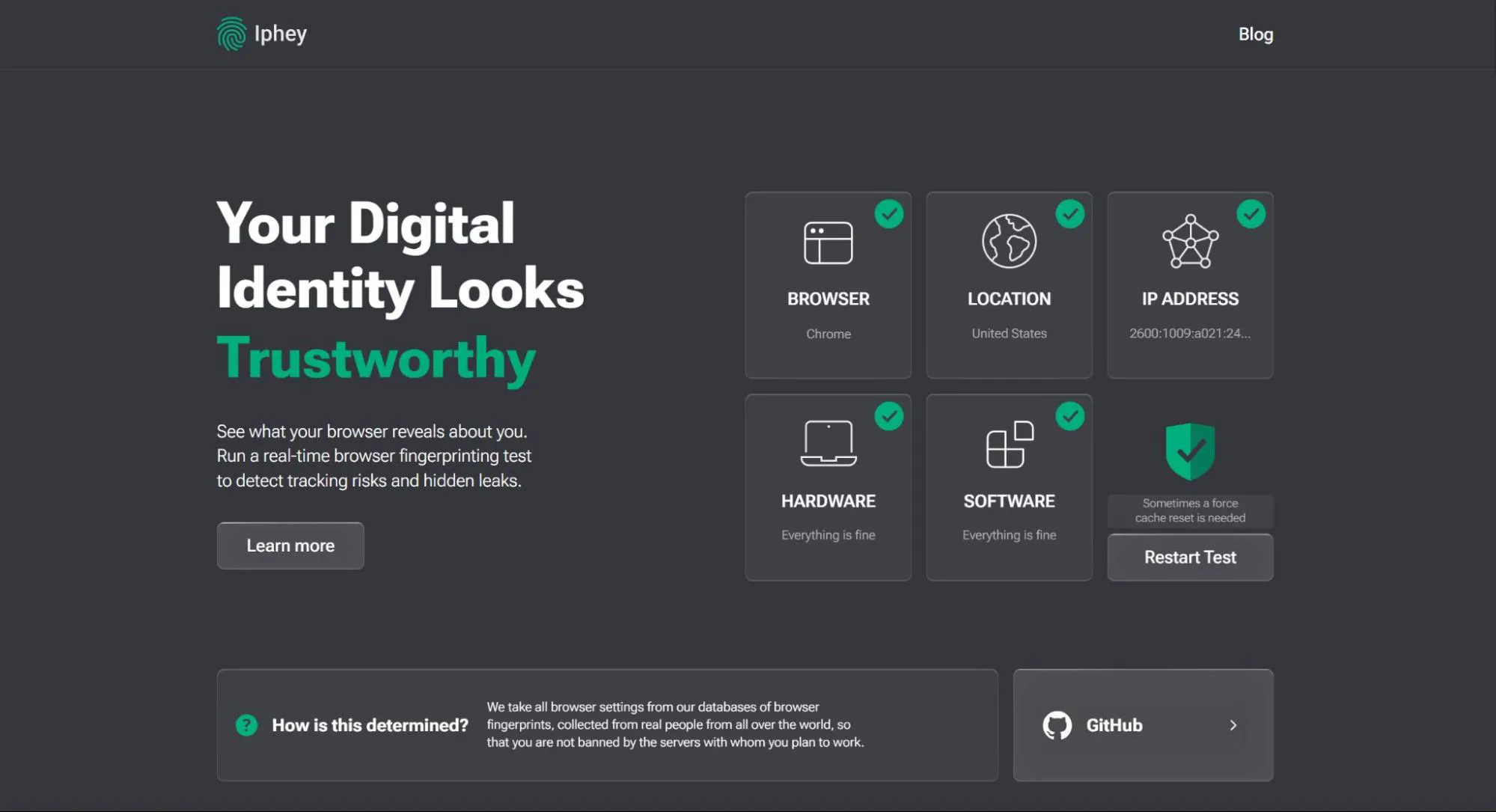
When you click on “Learn more” or scroll down, you’ll get a complete overview of the details Iphey was able to find about your fingerprint and device. For example, here are my hardware and location specs:
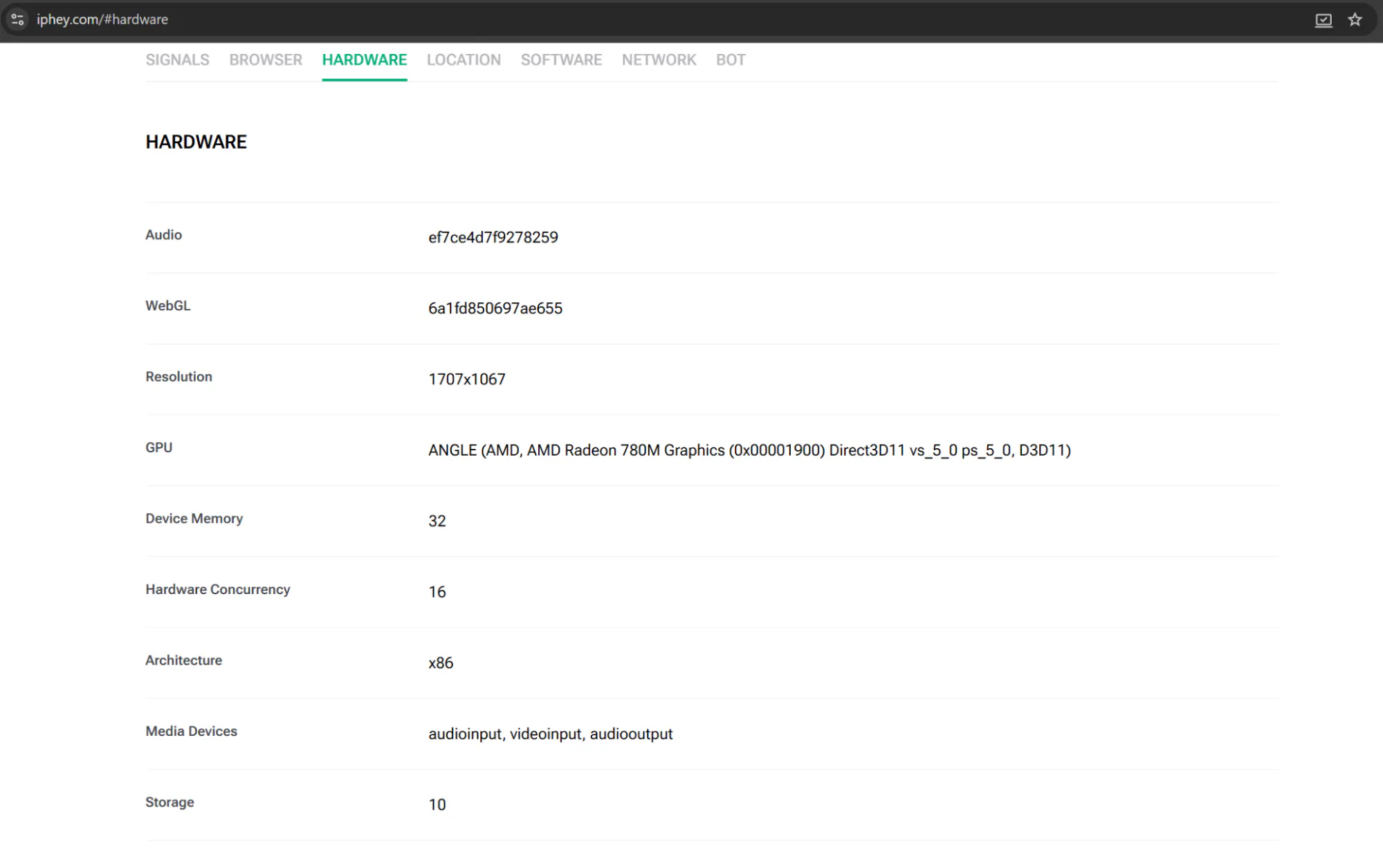
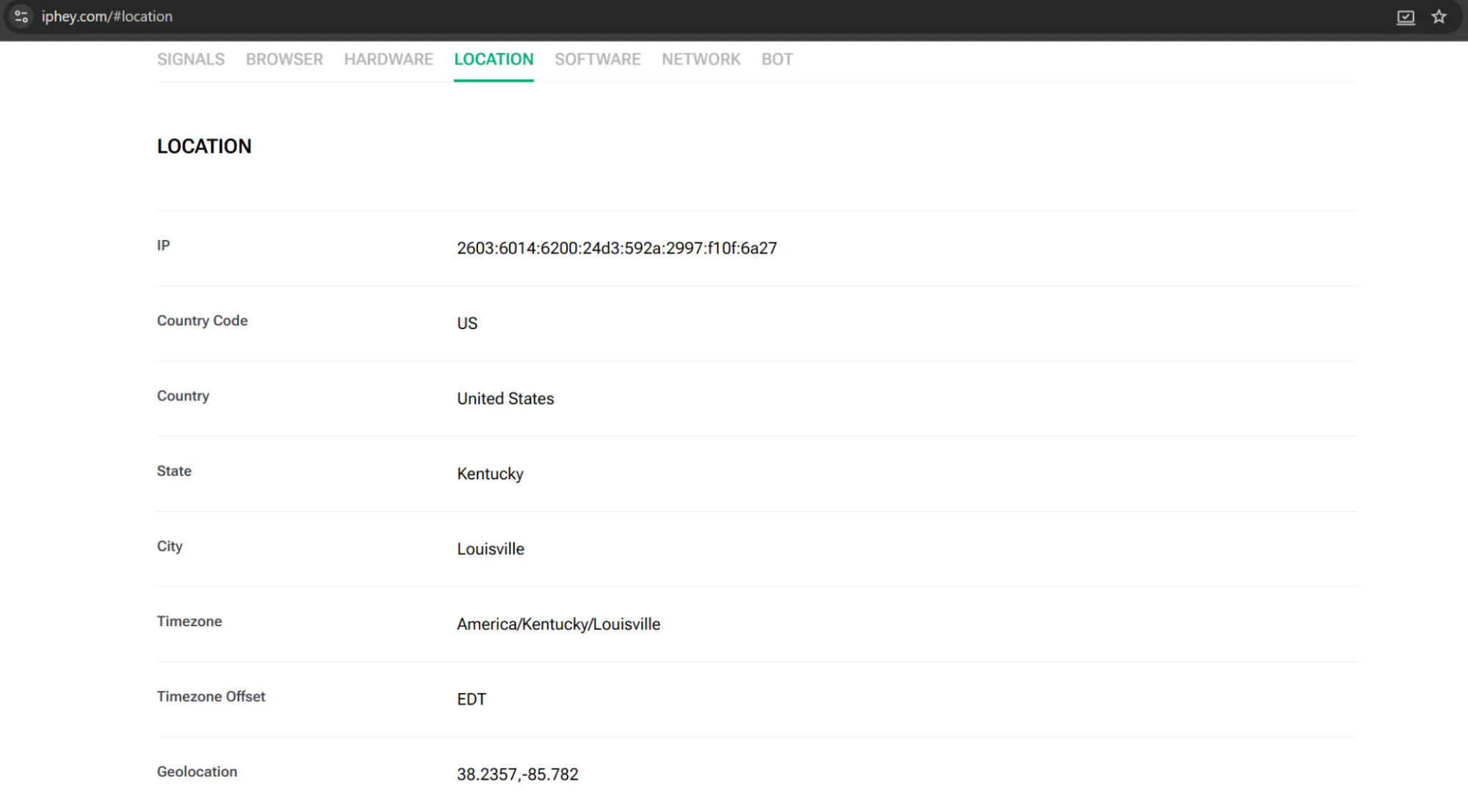
After the scan, it becomes glaringly obvious that anonymity is non-existent when your browser knows every little detail about your connection and is willing to share it with any platform that simply asks for it. But don’t fret, as tracking methods become more and more sophisticated, so do numerous bypass tools and methods. Now, let’s dig deeper into what browser fingerprinting consists of, what it’s used for, and how to successfully hide from it.
What is Browser Fingerprinting?
Browser fingerprinting is a tracking method that collects the unique combination of signals, settings, and details of your device and serves as one of the main online identifiers.
First of all, let’s establish what exactly browser fingerprinting is made up of.
- Browser and OS: their exact versions and individual settings, as well as browser extensions
- Timezone
- Language settings
- Hardware details: graphics card, device memory size, GPU model, CPU cores, drivers
- Software: system fonts, installed emoji set, plugins
- Screen details: resolution, device orientation, color/brightness settings
- Canvas/WebGL fingerprinting: audio signals and video graphics
Why You Need Fingerprint Protection
Your browser knows you a lot better than it’s letting on. On the surface, fingerprinting trackers are supposed to enhance your browsing experience – the browser shares your device specs with the destination website so that it knows how to display content correctly. However, this reasoning is only the tip of the iceberg. Most often, companies use browser fingerprints for:
- Bot prevention – every website wants to protect itself from malicious bots, such as web scrapers or automated scripts, in order to prevent spam and system abuse. To ensure that the platform is being used by real people, websites examine the user's fingerprint.
- Fraud detection and security – mainly used by fintech and e-commerce platforms as well as popular social media. Here, your browser fingerprint helps systems detect account takeover and payment fraud. By remembering your usual fingerprint, the website can later flag transactions, request extra verification, or send alerts if it spots that your profile is being used on a device with an unfamiliar fingerprint. Additionally, it prevents fake/mass account creation from one device even with different emails or IPs.
- Advertising and user tracking – ad companies use fingerprinting to track users, as well as their search history, across sites. Later this data is used to build behavioral profiles and serve users personalized ads, even without cookies.
- User experience and personalization – based on browser fingerprint, sites can restore user settings or sessions without requesting you to log in, or show you a localized version of its content based on your device’s region.
How to Prevent Browser Fingerprinting?
The common misconception about online privacy is that you can fully hide your online identity by using circumvention tools like VPNs or proxies. However, as you now know, browser fingerprint is a completely different beast – while circumvention tools are able to hide your IP and network location, they cannot protect your device from being tracked or erase its signals from existence.
Although browser fingerprinting is an advanced tracker that has evolved over the 15 years of its active usage, there are still ways to cut it down to the bare minimum if not bypass it completely.
- Anti-detect browsers
Anti-detect browsers hide your browser fingerprint by creating a new identity for your device or account, while also leaving said identity fully customizable. Stripping your device of any fingerprint would instantly trigger anti-bot systems to block your connection, this method serves as a high-level “camouflage” that makes you seem like a regular user without giving any of your actual information away.
The market offers a plethora of choices for anti-detect browsers but my personal go-to has been Gologin, as the service provides great performance, user-friendly interface, and, compared to other providers, keeps its pricing at an affordable range. Here’s a demonstration of how Gologin tackles browser fingerprinting:
After creating an account, you will need to download the Gologin client. There, go to the “All profiles” tab and either create a separate profile or use an existing one. Then, follow the “Proxy & Location” column to where it meets the line with your chosen profile, click “Choose location or proxy” and select any that suits you best.
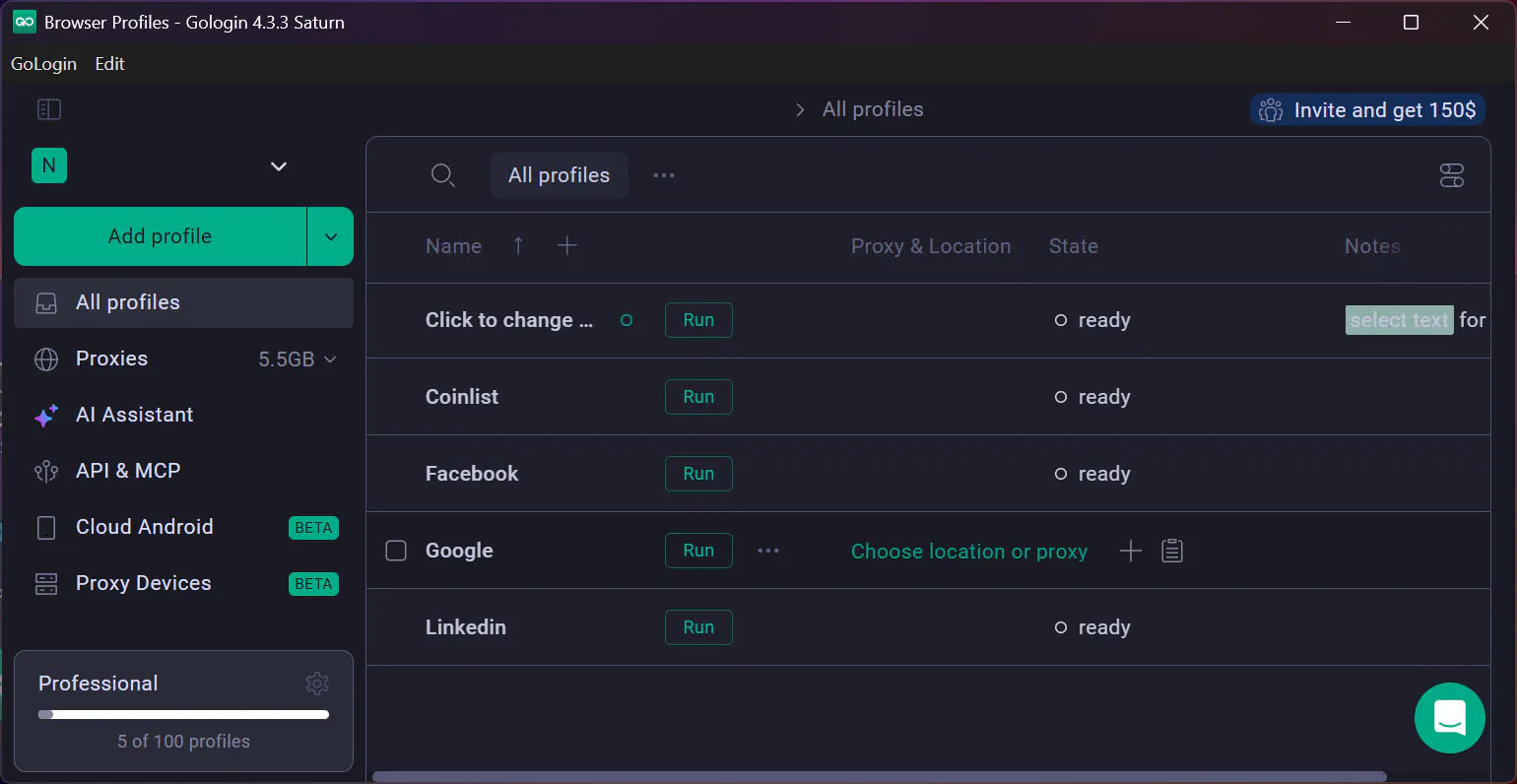
Additionally, you can click on “Settings” right next to your profile’s name and manually change every detail about your fingerprint or just refresh it entirely.
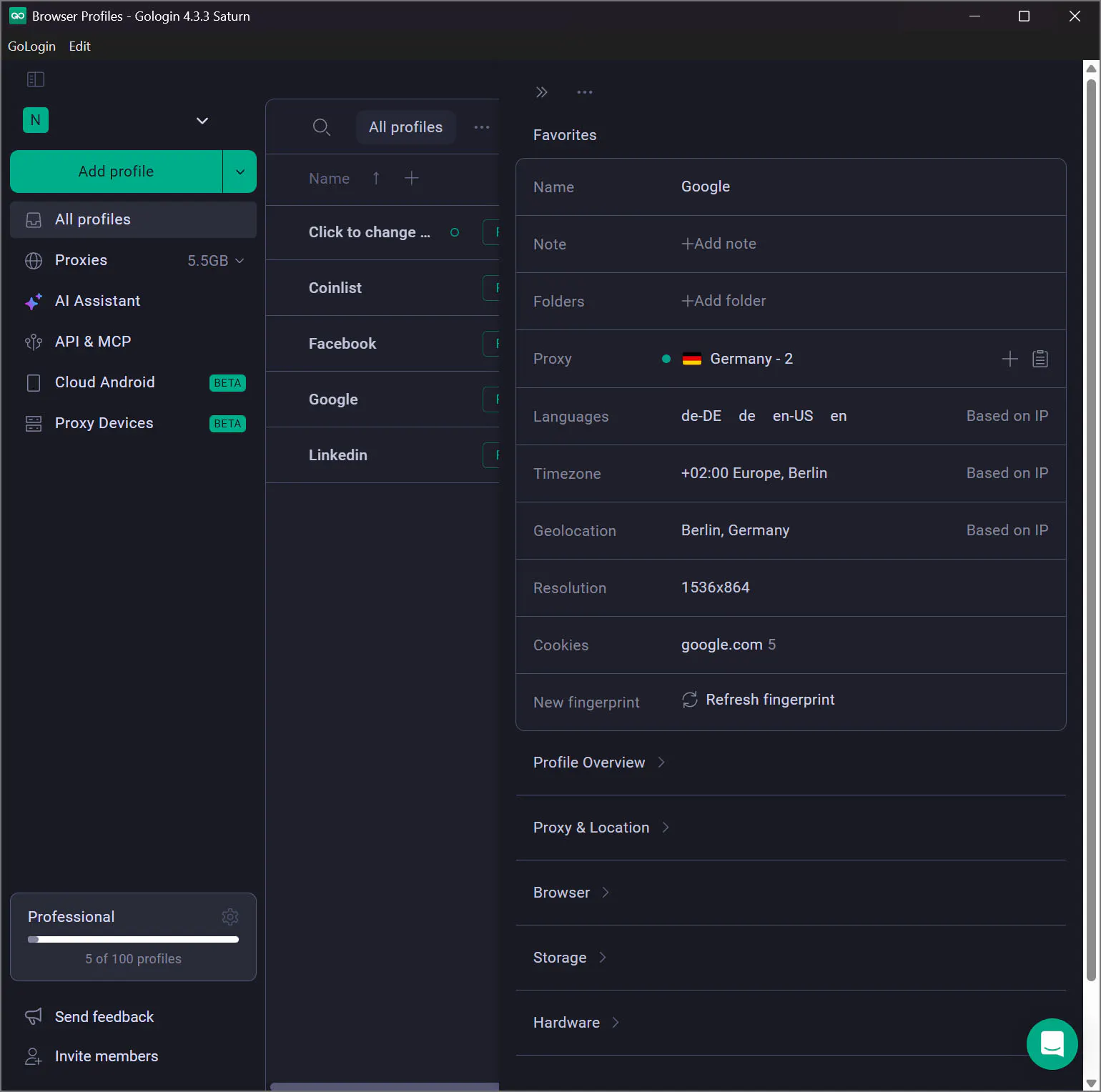
Once you’re all set, just click the “Run” button and a new browser window will open.
Now, let’s see if the settings worked – go to Iphey.com in Gologin’s browser and run the check again:
As you can see, Gologin not only changed my IP and location but also the hardware fingerprint. And contrary to using proxies, the browser now doesn’t spot that I’m utilizing a circumvention tool to hide my location. This level of bypassing is exactly what you need for keeping your online privacy fully safe and sound, which makes anti-detect browsers the best option for anti browser fingerprinting.
- Privacy-focused browsers
Browsers like Tor or Brave support fingerprint randomization; the feature is built into the service, so every time you visit a site through one of these options, the browser generates a random combination of settings and hides your real fingerprint. On the downside, browsers with heavy obfuscation technology require more processing power, which usually slows them down greatly in comparison to alternative methods.
- Anti-fingerprinting extensions
This method is a bit counterintuitive, since browser extensions are a part of the dataset actively tracked by fingerprinting and used to identify your device but it might suffice for basic browsing anonymity. Chrome extensions like Canvas Blocker, Privacy Badger or Fingerprint Defender, are viable options, as they take seconds to set up and are pretty easy to manage, although they might make you look even more unique to trackers.
Conclusion
Protecting your online privacy is a natural desire in a highly digitalized world, where trackers are prevalent. Although browser fingerprinting might seem like a rigid stalking mechanism, there are ways to trick it and stay anonymous on the web.